

Accounts and transfers
Players open the full bank at a branch counter. The eight default branches are the Fleeca banks, Blaine County Savings in Paleto Bay and Pacific Standard; you can move or add branches in the configuration. A teller stands behind each counter. The bank closes on its own when the player walks away from the counter or dies.Account types
Every account has its own number like
LS12 3456 7890: two letters
(Config.Accounts.NumberPrefix) and ten digits, the last two of them check
digits. A typo is caught before any money moves.
Savings
Savings accounts payConfig.Savings.InterestRate percent every
IntervalHours (default 0.5 % every 24 hours). Interest is only paid on the
first MaxInterestBalance (default $1,000,000).
By default, cash cannot be taken out of savings at the counter: players move
it to checking first. Config.Savings.CashWithdraw = true allows it.
Shared accounts
A shared account is for a couple, a flat share or a crew. The creator is the owner and adds players standing next to them.
Managers and members can leave the account at any time. Turning a manager
into a member, or removing someone, cancels the bank cards they held for that
account.
Business accounts
Every job listed inConfig.Business.Accounts gets one business account.
Players see it while that is their current job:
config.lua
view: lowest job grade that sees the account and may deposit.withdraw: lowest grade that may pay out, transfer and order cards.- The job’s boss grade always has full access.
Source = 'society' the balance is your existing society money
(esx_addonaccount, qb-management, qbx_management or qb-banking), so boss
menus and other scripts see the same amount. 'internal' keeps a separate
balance in RoadBanking.
Opening and closing
Open account creates a savings or shared account with a name of your choice. Limits:Config.Accounts.MaxSavings savings accounts per player and
MaxShared shared accounts a player may own or join. An optional
OpenFee is charged to the checking account.
An account can only be closed when its balance is zero. Closing it cancels
its cards and deletes its standing orders.
Transfers
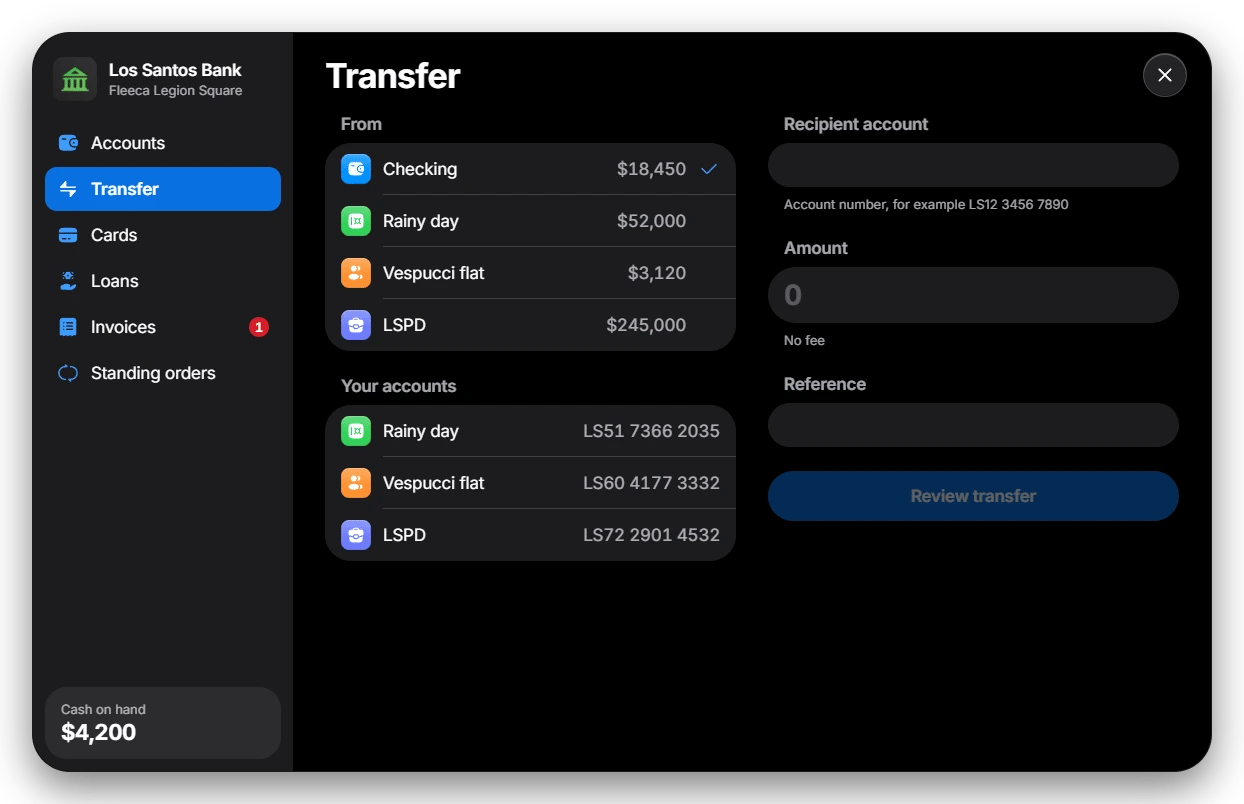
- Pick the account to pay from.
- Enter the recipient’s account number. Your own accounts are listed below for quick transfers between them.
- Enter the amount and an optional reference, then review the transfer. The review shows the recipient’s name before anything is booked.
Config.Transfers: a percentage fee with a minimum
and an optional cap, and a maximum per transfer (default $1,000,000).
Money sent to a player who is offline arrives when they log in.
Deposits and withdrawals
At the counter, players deposit cash into any account they may deposit to and withdraw from accounts they may withdraw from. The cash they carry is shown at the bottom of the sidebar.Standalone servers have no cash, so deposits and withdrawals are hidden
there. Transfers, cards and loans work.
History
Each account shows its bookings with a search over names and references, an All / In / Out filter and a chart of the last 30 days. Fees, interest, loan payments and invoices appear as their own lines. Other scripts can add lines for money they moved themselves withAddTransaction.