

Apps & Widgets
Two different things live in the headset. Apps open as floating windows you can move, resize and push away. Widgets stick into a wall and stay there.Apps
PressF7 for the home screen and every app is one tile. The home screen
spreads its tiles over at most three rows and never scrolls; when more apps are
installed than fit, page buttons appear.
Settings
Appearance, App icons, Glass & text, Windows, Home view, Comfort,
Notifications, General and Updates. Every choice is the player’s own; a
server setting does not override it.
Control Centre
Also on
F6. Clock, RoadPhone music and notifications on the left; Do Not
Disturb, Windows Follow, Widgets and Stow Windows in the middle with the
everyday actions; the environment with its immersion slider on the right.Character studio
Build the character other players see: skin, eyes, hair, beard, glasses,
earrings, headphones, three outfits, and sliders for height, build and
face. The preview is the real 3D model. Saved per character.
Vehicles
Every vehicle in your name. Locate one, or have a valet bring it
here for
Config.Valet.deliveryPrice.Map
A 3D map table on the floor. Look at it, hold the focus key and move your
head to push it around; the wheel zooms.
Destinations
Save up to twelve places, follow an AR direction indicator back to them,
and invite a friend to meet at one.
Spaces
Save up to six rooms — windows, nearby widgets and the environment — and
open them again later. Take anywhere brings them with you; Stay
here reopens at the saved location.
Environments
Surrounds you with a 3D landscape — Alpine Lake, Sand Dunes or Lunar
Surface. See Environments.
Friends
Your RoadVR account tag, who is online, and the profile picture other
players see — from the RoadPhone camera roll or an image URL.
Weather
In-game weather, temperature, wind, daylight and the next sunrise or
sunset.
Clock
The in-game time and date, a stopwatch, and a timer that keeps running
when the window is closed and notifies you when it ends.
Calculator
Exactly what it says.
Notes
Written notes. With RoadPhone and
Config.RoadPhone.notes on, they are
the phone’s notes — the same list in both places.Reminders
Lists and reminders with due dates, flags and notes. Today, Scheduled,
All, Flagged and Completed sort them for you, and a reminder that comes due
while the headset is on sends a notification.
Messages
The phone’s SMS threads as a second screen. Needs RoadPhone — without
it the icon stays and the app says messages are unavailable. Toggle with
Config.RoadPhone.messages.Photos
The RoadPhone camera roll, with a cinema view that puts a picture on a
curved screen. Needs RoadPhone.
Drone
Put a drone down, fly it and watch its camera. Needs the
roadvr_drone
item unless Config.Drone.item is empty.Some apps are not tiles on the home screen. Vehicle — the bar in the
windshield for doors, windows, lights, engine and locks — and the
Head-up display belong to the car and come up when you drive. Viewer
and Screen controls are opened by Photos. Window basics, the window
tutorial, starts from the first setup or from Settings → General.
Reminders use the player’s real local time, not the in-game clock. A
reminder that comes due while the headset is off does not send a
notification later.
Games
Minigolf
Two courses for up to six players in a private room. The course opens full
size in first person — walk, aim, hold and release to putt.
Chess
Against a friend or the computer at three strengths, on a 3D board the host
lays down in the world.
Darts
301 or 501 for up to six players on a board the host hangs on a wall — or
solo practice.
Arena
Team deathmatch for up to eight players in a 3D arena, with classes,
bots and friend invitations.
Beat
Cut blocks with two sabers to the music. Four difficulties, modifiers,
duels and eight tracks.
Basketball
Place a hoop and shoot — on your own, or in a timed duel against a player
next to you.
Games
How each game is played and configured
Apps and games written by other resources appear on the same home screen.
See Custom Apps, Custom Games
— and Custom Markers for annotating the world
itself, which needs no app at all.
Widgets
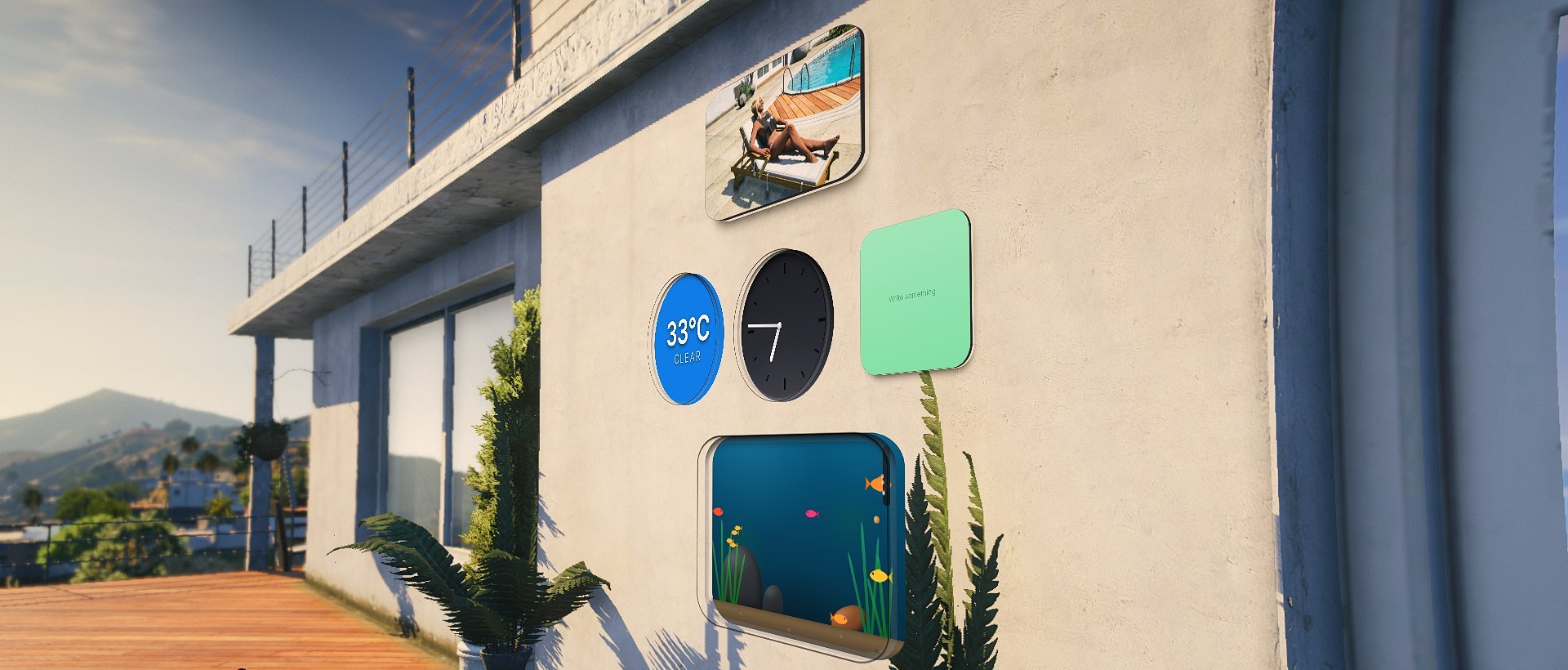
Clock
Three designs: Studio and Midnight analogue faces, or a wide
Flip clock. The design can be changed later.
Weather
A small illustrated weather station: conditions, temperature, wind and
daylight.
Calendar
A tear-off calendar with the in-game date.
Sticky note
Up to 180 characters on one of ten paper colours, square, wide or tall.
Photo frame
A picture from the RoadPhone gallery — framed, unframed or as an instant
photo.
Neon sign
Up to 22 characters of neon in one of ten colours, for labelling a room or
a door.
Aquarium
A window into water. It does nothing useful and everybody hangs one up.
Widgets belong to the player, not to the resource that provides them. A
resource restarting leaves them on the wall showing an unavailable plate
until it comes back — they are never silently removed from somebody’s room.
While an environment is running, widgets are hidden unless the player turns
on Widgets in an environment in Settings → Comfort.
Custom Widgets
Add your own widget kinds from your own resource
Limits worth knowing
number
default:"4"
How many app windows can be open at once. The home screen, Spaces and the
car’s displays do not count; opening one more closes the oldest.
number
default:"12"
How many widgets one player may have on walls.
number
default:"3"
How many widgets may hang within
clusterRadius metres of each other.
Config.Widgets.max is the ceiling for the whole character; this is the
ceiling for one spot, and it is the one that decides what a single picture
costs. A fourth in the same corner is refused and stays in the hand.Only new placements are checked — a wall that is already fuller than this
keeps everything on it. Replacing a widget keeps its place and its slot,
even at the limit. Set it to 0 to switch the near limit off and leave only
max.number
default:"5.0"
Metres. What counts as “the same spot” for
maxPerCluster. Measured against
the widget’s position, not the player’s view — where somebody happens to be
standing must not change whether a wall is full.number
default:"10.0"
Metres. Beyond this a widget is neither drawn nor tested against walls. It
stays saved — this is only about what is worth rendering.Held below
Config.Fade.panelDistance in code: a widget is gone by the time
the app windows even start to fade. Decoration must never outlive the
workspace, so raising this past that has no effect.number
default:"6.0"
Metres. How far away a widget may be placed.
number
default:"0.6"
Above this tilt a surface counts as floor or ceiling and takes no widget.
number
default:"2.2"
Metres. How close the wearer has to be for a widget to notice them. Only
widgets that do something with it care — the aquarium, whose fish come to the
glass when somebody walks up.
number
default:"4096"
How much content a single widget may carry — the photo it shows, the text on
a note. It lands in the profile JSON, so it needs a ceiling. Anything over is
dropped rather than trimmed: half a URL is worse than none.
number
default:"3"
Once this many app windows are visible in view at the same time, the widgets
step aside so the view does not fill up. Windows behind the player, stowed or
covered do not count, and the widgets come back once two fewer are in view.
The widget editor ignores the rule.
0 keeps widgets on regardless.string
default:"''"
Default key for the widget editor. Ships unbound; the editor opens from the
home screen and the Control Centre.