> ## Documentation Index
> Fetch the complete documentation index at: https://docs.roadshop.org/llms.txt
> Use this file to discover all available pages before exploring further.
# Environments
> Replace the world around the player with a 360° panorama
# Environments
The Environments app swaps the world around the player for a 360° panorama.
The windows stay where they are; only what is behind them changes.
**RoadVR ships without any panorama images.** The Environments app is
installed and configured, but the picture files are not in the download.
This page is how you add them.
## Why they are not included
One 8192×4096 equirectangular JPG is around 36 MB, and every player downloads
it once, in full. Shipping two or three would add a hundred megabytes to a
resource for pictures that may not suit your server at all.
Which panoramas belong on your server is your decision, not ours.
## What a panorama file looks like
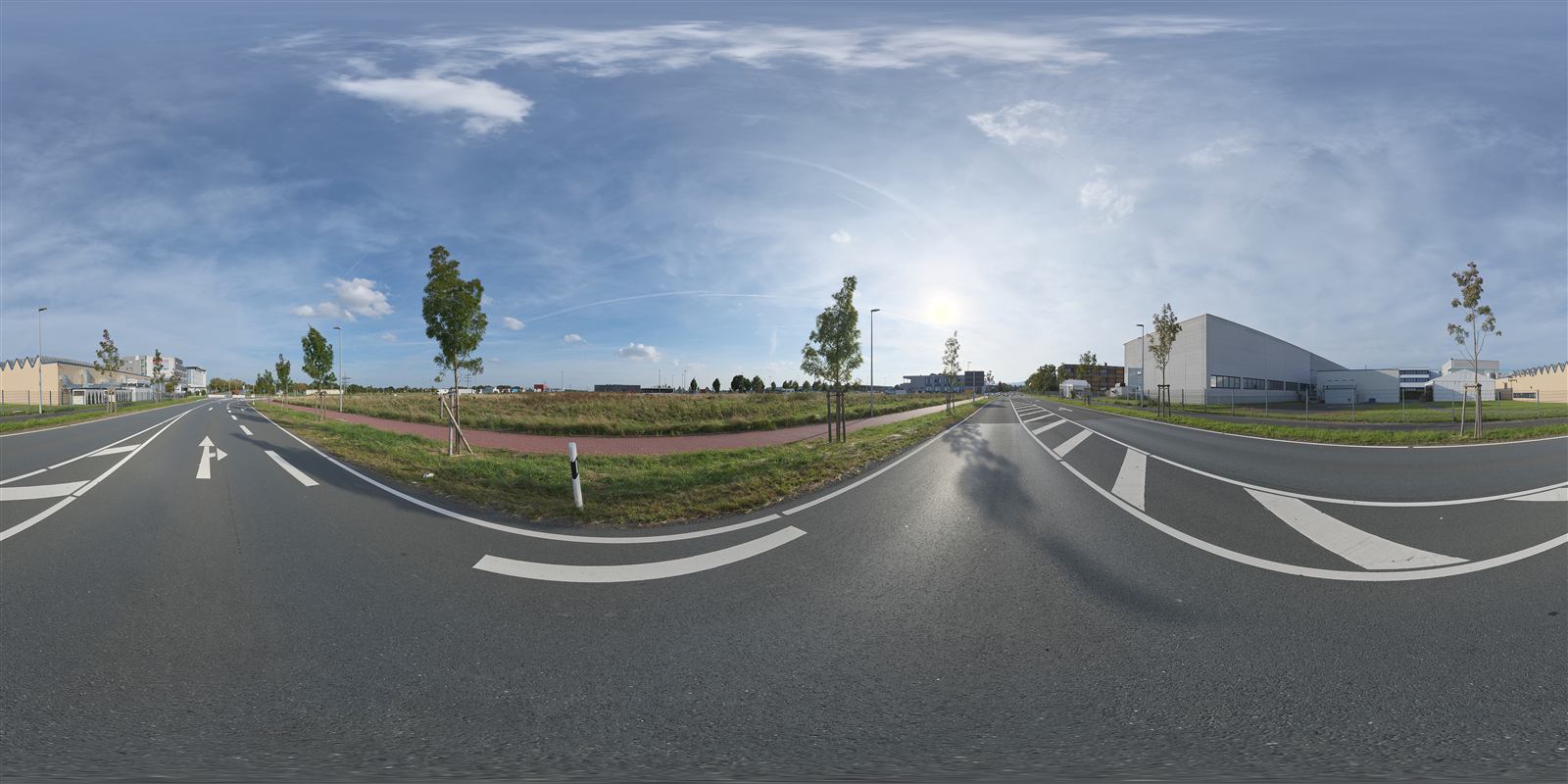 That is one file, flat. RoadVR wraps it onto a sphere around the player. The
format is called **equirectangular**: a 2:1 image where the horizontal axis is
a full 360° turn and the vertical axis goes from straight down to straight up.
Anything labelled *360° photo*, *equirectangular* or *HDRI* will work. A normal
photograph will not — it has no way to cover the whole sphere.
## Where to get them
Free, CC0, no attribution required. The two examples commented into
`config.lua` come from here.
`Config.Environments.list` ships **empty**, with those two written above it as
a comment to copy:
```lua config.lua theme={null}
Config.Environments = {
-- Empty on purpose: no panorama ships with the resource. Put your own
-- equirectangular images into public/environments/ and list them here.
--
-- { id = 'town', image = 'german_town_street.webp', label = 'Old town' },
-- { id = 'aquarium', image = 'ushaka_aquarium.webp', label = 'Aquarium' },
list = {},
```
## Adding one
Download the tonemapped JPG, then re-encode to **WebP at 4096×2048,
quality 90**:
```bash theme={null}
ffmpeg -i in.jpg -vf scale=4096:2048:flags=lanczos -c:v libwebp -quality 90 -preset picture out.webp
```
This matters more than anything else on this page. The two examples went
from 72 MB to 3.8 MB with no visible difference on the sphere — and that is
72 MB every single player would have downloaded.
`texture` below scales anything larger down to 4096 anyway, so the extra
pixels only ever cost the download and the decode.
A smaller `texture` value in the config does **not** shrink the download
and does not spare the decode: an 8192 image is unpacked at full size
first and scaled down afterwards. If a panorama stutters when it opens,
the fix is a smaller **file**, not a smaller number in the config.
Put the file in `public/environments/`.
WebP, JPG and PNG all work. WebP first, because at equal quality it is by
far the smallest of the three.
```lua config.lua theme={null}
Config.Environments = {
list = {
{ id = 'town', image = 'german_town_street.webp', label = 'Old town' },
{ id = 'aquarium', image = 'ushaka_aquarium.webp', label = 'Aquarium' },
{ id = 'my_rooftop', image = 'my_rooftop.webp', label = 'Rooftop' },
},
}
```
`label` is shown to the player exactly as written — it does **not** go
through the interface's language files. Write it in the language your
players read.
`id` has to stay stable — it is what a player's saved choice points at.
`label` is what they see in the picker and can be changed any time.
```
ensure roadvr
```
## The rest of the block
Where the slider starts when a panorama is picked. `1.0` is fully opaque.
Metres per second. Walk faster than this and the panorama pulls back so the
player can see where they are going.
Milliseconds of standing still before it comes back.
Apps that may not be open while a panorama is up, by app id.
All three put something into the **world** rather than into a window — the
hoop, the drone, the map table's surroundings — and the sphere is exactly
what stands between the player and the world. An app that is only a window
has no reason to be listed: it sits inside the sphere and stays perfectly
readable.
It works both ways: opening one while an environment runs is refused with a
notification, and starting an environment closes the ones already open.
Leave the list empty to switch the rule off entirely.
Maximum edge length in pixels, capping **video memory only**. A 4096 panorama
costs about 45 MB including mipmaps, an 8192 about 180 MB — and the GPS map
table wants its share of that budget too.
## Troubleshooting
The file name in `config.lua` does not match the file in
`public/environments/`. Check the extension too — `.webp` and `.jpg` are
two different files.
The file is too large. Re-encode to 4096×2048 WebP. Lowering `texture` will
not help — see the warning above.
It is not equirectangular. The source has to be a 2:1 360° image; a normal
photo or a 16:9 render cannot cover the sphere.
That is `blockedApps` doing its job. Remove the app id from the list if you
would rather allow it.
That is one file, flat. RoadVR wraps it onto a sphere around the player. The
format is called **equirectangular**: a 2:1 image where the horizontal axis is
a full 360° turn and the vertical axis goes from straight down to straight up.
Anything labelled *360° photo*, *equirectangular* or *HDRI* will work. A normal
photograph will not — it has no way to cover the whole sphere.
## Where to get them
Free, CC0, no attribution required. The two examples commented into
`config.lua` come from here.
`Config.Environments.list` ships **empty**, with those two written above it as
a comment to copy:
```lua config.lua theme={null}
Config.Environments = {
-- Empty on purpose: no panorama ships with the resource. Put your own
-- equirectangular images into public/environments/ and list them here.
--
-- { id = 'town', image = 'german_town_street.webp', label = 'Old town' },
-- { id = 'aquarium', image = 'ushaka_aquarium.webp', label = 'Aquarium' },
list = {},
```
## Adding one
Download the tonemapped JPG, then re-encode to **WebP at 4096×2048,
quality 90**:
```bash theme={null}
ffmpeg -i in.jpg -vf scale=4096:2048:flags=lanczos -c:v libwebp -quality 90 -preset picture out.webp
```
This matters more than anything else on this page. The two examples went
from 72 MB to 3.8 MB with no visible difference on the sphere — and that is
72 MB every single player would have downloaded.
`texture` below scales anything larger down to 4096 anyway, so the extra
pixels only ever cost the download and the decode.
A smaller `texture` value in the config does **not** shrink the download
and does not spare the decode: an 8192 image is unpacked at full size
first and scaled down afterwards. If a panorama stutters when it opens,
the fix is a smaller **file**, not a smaller number in the config.
Put the file in `public/environments/`.
WebP, JPG and PNG all work. WebP first, because at equal quality it is by
far the smallest of the three.
```lua config.lua theme={null}
Config.Environments = {
list = {
{ id = 'town', image = 'german_town_street.webp', label = 'Old town' },
{ id = 'aquarium', image = 'ushaka_aquarium.webp', label = 'Aquarium' },
{ id = 'my_rooftop', image = 'my_rooftop.webp', label = 'Rooftop' },
},
}
```
`label` is shown to the player exactly as written — it does **not** go
through the interface's language files. Write it in the language your
players read.
`id` has to stay stable — it is what a player's saved choice points at.
`label` is what they see in the picker and can be changed any time.
```
ensure roadvr
```
## The rest of the block
Where the slider starts when a panorama is picked. `1.0` is fully opaque.
Metres per second. Walk faster than this and the panorama pulls back so the
player can see where they are going.
Milliseconds of standing still before it comes back.
Apps that may not be open while a panorama is up, by app id.
All three put something into the **world** rather than into a window — the
hoop, the drone, the map table's surroundings — and the sphere is exactly
what stands between the player and the world. An app that is only a window
has no reason to be listed: it sits inside the sphere and stays perfectly
readable.
It works both ways: opening one while an environment runs is refused with a
notification, and starting an environment closes the ones already open.
Leave the list empty to switch the rule off entirely.
Maximum edge length in pixels, capping **video memory only**. A 4096 panorama
costs about 45 MB including mipmaps, an 8192 about 180 MB — and the GPS map
table wants its share of that budget too.
## Troubleshooting
The file name in `config.lua` does not match the file in
`public/environments/`. Check the extension too — `.webp` and `.jpg` are
two different files.
The file is too large. Re-encode to 4096×2048 WebP. Lowering `texture` will
not help — see the warning above.
It is not equirectangular. The source has to be a 2:1 360° image; a normal
photo or a 16:9 render cannot cover the sphere.
That is `blockedApps` doing its job. Remove the app id from the list if you
would rather allow it.