> ## Documentation Index
> Fetch the complete documentation index at: https://docs.roadshop.org/llms.txt
> Use this file to discover all available pages before exploring further.
# Apps & Widgets
> Everything that ships with the RoadVR headset
# Apps & Widgets
Two different things live in the headset. **Apps** open as floating windows you
can move, resize and push away. **Widgets** stick into a wall and stay there.
## Apps
Press `F7` for the home screen and every app is one tile.
Two of the ones below are **not** tiles on the home screen: the **Cockpit**
and the **HUD** belong to the car and come up when you drive. A handful of
others — the single-photo viewer, the cinema bar — are opened by the app that
owns them rather than by you.
Theme, accent colour, interface language, default anchor. Each player's
own — a server setting does not override it.
One key for the things you reach for constantly: what is playing, what came
in, whether windows follow you, which environment is on.
YouTube in a window, with the remote in the control centre. Ships as its
own resource in `examples/roadvr_mediaapp` — `ensure` it and it takes its
place on the home screen like any other app.
Your vehicle, plus **Valet** — have it brought to you.
A 3D map table you can lean over, not a flat minimap.
Replaces the world around you with a panorama. Ships without images — see
[Environments](/roadvr/environments).
In-game weather, wind, sunrise and sunset.
The in-game clock and calendar.
Exactly what it says.
Written notes, saved to the player's profile.
The phone's SMS threads as a second screen. **Needs RoadPhone** — without
it the icon stays and the app says messages are unavailable. Toggle with
`Config.RoadPhone.messages`.
Your gallery, with a cinema view that puts a picture on a curved screen.
Fly a drone and watch its camera feed in a window.
Instruments that hang in front of you while you drive.
A compact status strip in your field of view.
Place a hoop and shoot.
Apps written by other resources appear on the same home screen, next to
these. See [Custom Apps](/roadvr/custom-apps).
## Widgets
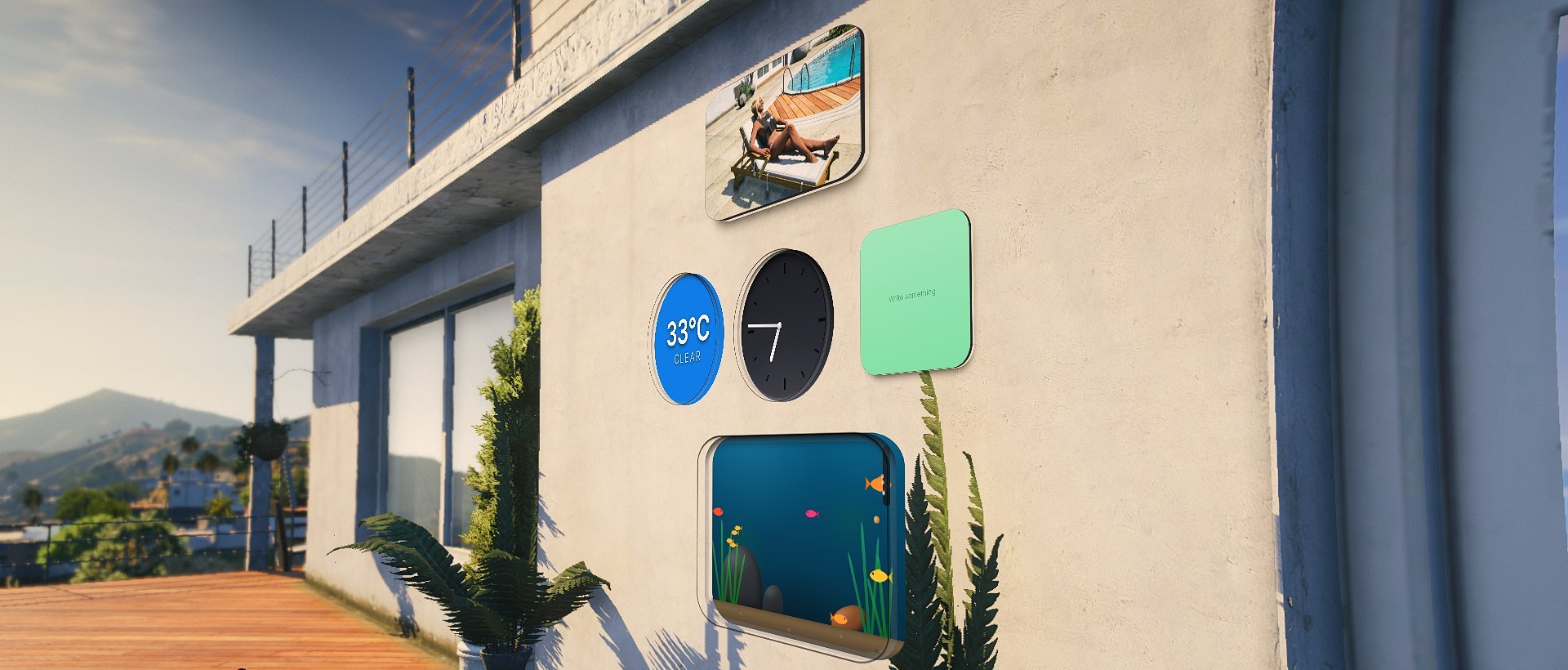 Press `G`, pick a tile from the bar, carry it to a wall and let go. The mouse
wheel resizes the one you are carrying.
An analogue face, recessed into the wall.
Temperature and conditions at a glance.
A written note that stays on the wall.
A picture from your gallery, framed.
The in-game date.
Free text, for labelling a room or a door.
A window into water. It does nothing useful and everybody hangs one up.
Widgets belong to the **player**, not to the resource that provides them. A
resource restarting leaves them on the wall showing an *unavailable* plate
until it comes back — they are never silently removed from somebody's room.
Add your own widget kinds from your own resource
## Limits worth knowing
How many app windows can be open at once.
How many widgets one player may have on walls.
How many widgets may hang within `clusterRadius` metres of each other.
`Config.Widgets.max` is the ceiling for the whole character; this is the
ceiling for one spot, and it is the one that decides what a single picture
costs. A fourth in the same corner is refused and stays in the hand.
Only **new** placements are checked — a wall that is already fuller than this
keeps everything on it. Set it to `0` to switch the near limit off and leave
only `max`.
Metres. What counts as "the same spot" for `maxPerCluster`. Measured against
the widget's position, not the player's view — where somebody happens to be
standing must not change whether a wall is full.
Metres. Beyond this a widget is neither drawn nor tested against walls. It
stays saved — this is only about what is worth rendering.
Held below `Config.Fade.panelDistance` in code: a widget is gone by the time
the app windows even *start* to fade. Decoration must never outlive the
workspace, so raising this past that has no effect.
Metres. How far away a widget may be placed.
Metres. How close the wearer has to be for a widget to notice them. Only
widgets that do something with it care — the aquarium, whose fish come to the
glass when somebody walks up.
How much content a single widget may carry — the photo it shows, the text on
a note. It lands in the profile JSON, so it needs a ceiling. Anything over is
dropped rather than trimmed: half a URL is worse than none.
Once this many app windows are open, the widgets step aside so the view does
not fill up.
Press `G`, pick a tile from the bar, carry it to a wall and let go. The mouse
wheel resizes the one you are carrying.
An analogue face, recessed into the wall.
Temperature and conditions at a glance.
A written note that stays on the wall.
A picture from your gallery, framed.
The in-game date.
Free text, for labelling a room or a door.
A window into water. It does nothing useful and everybody hangs one up.
Widgets belong to the **player**, not to the resource that provides them. A
resource restarting leaves them on the wall showing an *unavailable* plate
until it comes back — they are never silently removed from somebody's room.
Add your own widget kinds from your own resource
## Limits worth knowing
How many app windows can be open at once.
How many widgets one player may have on walls.
How many widgets may hang within `clusterRadius` metres of each other.
`Config.Widgets.max` is the ceiling for the whole character; this is the
ceiling for one spot, and it is the one that decides what a single picture
costs. A fourth in the same corner is refused and stays in the hand.
Only **new** placements are checked — a wall that is already fuller than this
keeps everything on it. Set it to `0` to switch the near limit off and leave
only `max`.
Metres. What counts as "the same spot" for `maxPerCluster`. Measured against
the widget's position, not the player's view — where somebody happens to be
standing must not change whether a wall is full.
Metres. Beyond this a widget is neither drawn nor tested against walls. It
stays saved — this is only about what is worth rendering.
Held below `Config.Fade.panelDistance` in code: a widget is gone by the time
the app windows even *start* to fade. Decoration must never outlive the
workspace, so raising this past that has no effect.
Metres. How far away a widget may be placed.
Metres. How close the wearer has to be for a widget to notice them. Only
widgets that do something with it care — the aquarium, whose fish come to the
glass when somebody walks up.
How much content a single widget may carry — the photo it shows, the text on
a note. It lands in the profile JSON, so it needs a ceiling. Anything over is
dropped rather than trimmed: half a URL is worse than none.
Once this many app windows are open, the widgets step aside so the view does
not fill up.