> ## Documentation Index
> Fetch the complete documentation index at: https://docs.roadshop.org/llms.txt
> Use this file to discover all available pages before exploring further.
# Metadata System
> Enable item-based phone data storage for phone stealing, trading, and multiple phones
# Metadata System
The metadata system stores phone data (contacts, messages, notes, settings) directly on the phone item in the player's inventory. This enables powerful roleplay features like phone stealing, phone trading, and owning multiple phones with separate data.
## Why Use Metadata?
When a player steals another player's phone, they can see all the victim's data - messages, contacts, photos, and more.
When a phone is given or sold to another player, all data stays on the phone and transfers with it.
Each phone item has its own unique phone number and data. Players can own multiple phones for different purposes.
Phone data is stored on the item itself, making it independent of player identity.
***
## Configuration
Open `config.lua` and configure the following options:
```lua config.lua theme={null}
-- Enable the metadata system
Config.UseMetadata = true
-- Choose your inventory system
Config.InventorySystem = 'ox_inventory' -- Options: 'ox_inventory', 'jaksam'
-- Enable phone backup system (recommended)
Config.BackupEnabled = true
```
### Configuration Options
| Option | Type | Default | Description |
| ------------------------ | ------- | ---------- | ------------------------------------------ |
| `Config.UseMetadata` | boolean | `false` | Enable/disable the metadata system |
| `Config.InventorySystem` | string | `'jaksam'` | Your inventory system |
| `Config.BackupEnabled` | boolean | `true` | Allow players to backup/restore phone data |
***
## Supported Inventory Systems
Full metadata support with all features. **Requires** a small modification (see below).
**Compatibility:** ESX, QBCore, Qbox & Standalone
Full metadata support out of the box. No modifications required.
**Compatibility:** ESX, QBCore, Qbox
Other inventory systems (qb-inventory, codem) have limited metadata support. For the best experience, use ox\_inventory or jaksam\_inventory. We work on a support to add more Inventorys.
***
## ox\_inventory Setup
When using `ox_inventory`, you need to remove some default code that interferes with RoadPhone's phone handling.
Navigate to: `ox_inventory/modules/items/client.lua`
Look for the `phone` item registration and remove or comment out the entire block.
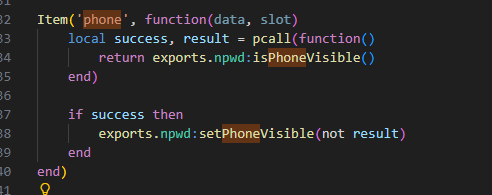 The code block to remove looks similar to this:
```lua theme={null}
-- Remove this entire block from here
Item('phone', function(data, slot)
end)
-- to here
```
After removing the code, restart your FiveM server for changes to take effect.
This step is required because ox\_inventory has built-in phone handling that conflicts with RoadPhone's metadata system.
***
## How It Works
### Data Flow
When a player uses a phone from their inventory, RoadPhone reads the metadata stored on that specific item.
If the phone has no number assigned, a unique number is generated and stored in the item's metadata.
All phone data (contacts, messages, settings, etc.) is loaded from the item's metadata.
Any changes (new contacts, messages, settings) are immediately saved back to the item's metadata.
### Multiple Phones
When a player has multiple phones in their inventory:
1. The system tracks which phone slot is currently active
2. Each phone has its own phone number and data
3. Switching phones loads the new phone's data automatically
***
## Metadata Structure
Each phone item stores the following data in its metadata:
```lua theme={null}
{
-- Phone Identity
phone_number = "1234567", -- Unique phone number
phone_owner = "John Doe", -- Original owner name
phone_assigned_date = 1234567890, -- Unix timestamp when assigned
phone_setup = 1, -- 0 = needs setup, 1 = complete
-- Security
phone_pin = "123456", -- 6-digit PIN (nil if not set)
phone_pin_needed = 1, -- 0 = no PIN, 1 = PIN required
-- Customization
phone_background = "/path/to/bg", -- Custom wallpaper
phone_settings = {
brightness = 100, -- 10-100
flightmode = 0, -- 0 or 1
darkmode = 0, -- 0 or 1
large_app_icons = 0, -- 0 or 1
iconcolor = "light" -- "light" or "dark"
},
-- Data
phone_contacts = { ... }, -- Array of contacts
phone_notes = { ... }, -- Array of notes
phone_photos = { ... }, -- Array of photos
phone_messages = { ... }, -- Messages structure
phone_alarms = { ... }, -- Array of alarms
-- Accounts
phone_account = { ... }, -- RoadID account
phone_twitter_account = { ... }, -- TweetWave account
phone_connect_account = { ... } -- Connect account
}
```
***
## Backup System
With `Config.BackupEnabled = true`, players can backup and restore their phone data.
### Features
* **Manual Backups**: Players can create backups anytime
* **Backup Naming**: Custom names for easy identification
* **Restore**: Restore any previous backup to current phone
* **Limit**: Maximum 5 backups per phone number
### Use Cases
* Before giving away a phone, backup the data
* Restore data to a new phone after losing the old one
* Keep multiple backup points for important data
***
## Troubleshooting
**Possible causes:**
* `Config.UseMetadata` is set to `false`
* Inventory system doesn't support metadata
* Wrong `Config.InventorySystem` value
**Solution:** Verify your config matches your actual inventory system.
**Possible causes:**
* Active phone slot tracking issue
* Player has multiple phones
**Solution:** Ensure the player is using the correct phone from their inventory.
**Possible causes:**
* Default phone code not removed from ox\_inventory
* Conflicting phone resource
**Solution:** Follow the ox\_inventory setup steps above to remove the conflicting code.
**Possible causes:**
* Metadata not saving properly
* Inventory system issue
**Solution:** Check server console for errors related to metadata updates.
***
## Migration from Non-Metadata
If you're switching from the non-metadata system to metadata:
Existing phone data stored in the database will not automatically transfer to item metadata. Players will start with fresh phones.
### Migration Options
1. **Fresh Start**: Simply enable metadata - all phones start fresh
2. **Manual Migration**: Use the `/phonemigrate` command (see [Phone Migrate](roadphonepro/commands/migrate))
3. **Backup First**: Have players backup important data before migration
***
## Developer Integration
For developers wanting to interact with the metadata system programmatically, see the [Metadata Exports](/roadphonepro/api/metadata) documentation.
The code block to remove looks similar to this:
```lua theme={null}
-- Remove this entire block from here
Item('phone', function(data, slot)
end)
-- to here
```
After removing the code, restart your FiveM server for changes to take effect.
This step is required because ox\_inventory has built-in phone handling that conflicts with RoadPhone's metadata system.
***
## How It Works
### Data Flow
When a player uses a phone from their inventory, RoadPhone reads the metadata stored on that specific item.
If the phone has no number assigned, a unique number is generated and stored in the item's metadata.
All phone data (contacts, messages, settings, etc.) is loaded from the item's metadata.
Any changes (new contacts, messages, settings) are immediately saved back to the item's metadata.
### Multiple Phones
When a player has multiple phones in their inventory:
1. The system tracks which phone slot is currently active
2. Each phone has its own phone number and data
3. Switching phones loads the new phone's data automatically
***
## Metadata Structure
Each phone item stores the following data in its metadata:
```lua theme={null}
{
-- Phone Identity
phone_number = "1234567", -- Unique phone number
phone_owner = "John Doe", -- Original owner name
phone_assigned_date = 1234567890, -- Unix timestamp when assigned
phone_setup = 1, -- 0 = needs setup, 1 = complete
-- Security
phone_pin = "123456", -- 6-digit PIN (nil if not set)
phone_pin_needed = 1, -- 0 = no PIN, 1 = PIN required
-- Customization
phone_background = "/path/to/bg", -- Custom wallpaper
phone_settings = {
brightness = 100, -- 10-100
flightmode = 0, -- 0 or 1
darkmode = 0, -- 0 or 1
large_app_icons = 0, -- 0 or 1
iconcolor = "light" -- "light" or "dark"
},
-- Data
phone_contacts = { ... }, -- Array of contacts
phone_notes = { ... }, -- Array of notes
phone_photos = { ... }, -- Array of photos
phone_messages = { ... }, -- Messages structure
phone_alarms = { ... }, -- Array of alarms
-- Accounts
phone_account = { ... }, -- RoadID account
phone_twitter_account = { ... }, -- TweetWave account
phone_connect_account = { ... } -- Connect account
}
```
***
## Backup System
With `Config.BackupEnabled = true`, players can backup and restore their phone data.
### Features
* **Manual Backups**: Players can create backups anytime
* **Backup Naming**: Custom names for easy identification
* **Restore**: Restore any previous backup to current phone
* **Limit**: Maximum 5 backups per phone number
### Use Cases
* Before giving away a phone, backup the data
* Restore data to a new phone after losing the old one
* Keep multiple backup points for important data
***
## Troubleshooting
**Possible causes:**
* `Config.UseMetadata` is set to `false`
* Inventory system doesn't support metadata
* Wrong `Config.InventorySystem` value
**Solution:** Verify your config matches your actual inventory system.
**Possible causes:**
* Active phone slot tracking issue
* Player has multiple phones
**Solution:** Ensure the player is using the correct phone from their inventory.
**Possible causes:**
* Default phone code not removed from ox\_inventory
* Conflicting phone resource
**Solution:** Follow the ox\_inventory setup steps above to remove the conflicting code.
**Possible causes:**
* Metadata not saving properly
* Inventory system issue
**Solution:** Check server console for errors related to metadata updates.
***
## Migration from Non-Metadata
If you're switching from the non-metadata system to metadata:
Existing phone data stored in the database will not automatically transfer to item metadata. Players will start with fresh phones.
### Migration Options
1. **Fresh Start**: Simply enable metadata - all phones start fresh
2. **Manual Migration**: Use the `/phonemigrate` command (see [Phone Migrate](roadphonepro/commands/migrate))
3. **Backup First**: Have players backup important data before migration
***
## Developer Integration
For developers wanting to interact with the metadata system programmatically, see the [Metadata Exports](/roadphonepro/api/metadata) documentation.