> ## Documentation Index
> Fetch the complete documentation index at: https://docs.roadshop.org/llms.txt
> Use this file to discover all available pages before exploring further.
# FAQ
> All important questions about RoadCarPlay — setup, troubleshooting, and tips
Use this page to quickly find answers to common questions and fixes. If something is missing, reach out on our Discord server.
Please post a detailed bug report in our Discord channel **#errors**. Include steps to reproduce, screenshots, and logs if possible. We'll try to fix it as soon as we can.
Songs that players submit through the Music app have to be approved before they land in the library. The approval permission is handed out in-game with **`/carmusic-verify`**:
```bash theme={null}
/carmusic-verify PLAYERID
```
* The command **toggles**: no permission → grants it, already has it → revokes it
* `PLAYERID` is the **server ID** of the player (visible in the player list / txAdmin)
* Only administrators can run the command
Full command reference for RoadCarPlay
A fresh library only fills up once songs have been **submitted and approved**. Work through this checklist:
Players submit songs directly in the app. They land in the pending queue first, not in the library.
Someone with the music approval permission (see above) has to approve them. Once approved, they show up in the library for everyone.
Make sure you're using our **xSound** version and start **xSound before RoadPad**.
**Checklist**
* Clear your client cache.
* Check that **GTA music** is turned on.
* Verify your **Windows volume mixer** isn't at 0% (this is independent of FiveM).
If your loading screen uses **YouTube** and you muted it there, the sound is muted everywhere. Unmute the loading screen.
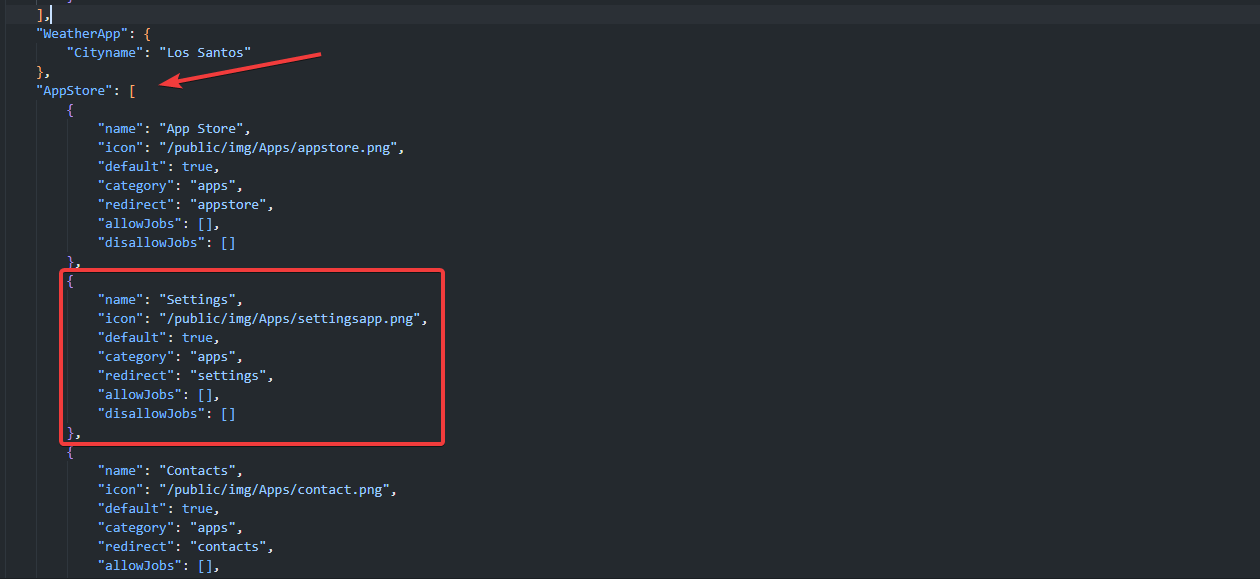
 Open **/public/static/config/config.json**, search for **AppStore**, and remove the block for the app(s) you want to disable.